Tracking Clash of Clans Member Activity with Dataform and BigQuery
Before getting started, remember that this is the third post related to this project, so I recommend checking out the following links before diving in here:
- https://josechavez.net/analysis/robust-elt-pipeline/
- https://josechavez.net/analysis/data-transformation-dataform/
I’m taking a slightly different approach with this post because I want us to step into the role of metric designers. For this, I will use the Clash of Clans project as a starting point. Alright, we start our routine and the clan leader (or our boss) asks us to determine who the active members are, to manage promotions or kicks. So, we are assigned the task of reporting these data to him daily so he can make decisions based on updated information every morning while sipping his coffee.
Where Do We Start?
The main thing is to ensure we have conceptual alignment. The clan leader asked us to determine who the active members are, but what does it mean to be active? After having a meeting with the leader and asking him, he tells us the following: An active member is one who, during the last 7 days, performed one of the following actions:
- Attacked in a war.
- Upgraded their Town Hall.
- Upgraded a hero.
- Upgraded a hero ability.
- Upgraded a spell.
- Contributed to capital raids.
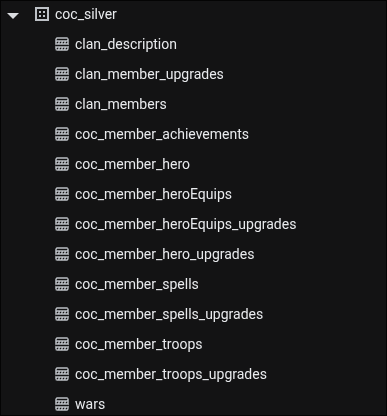
Fortunately, we have the historical information in the pipeline we designed, we just need to write the logic and answer the business question. Since we are visionaries, we proposed creating a consolidated “activity” indicator, which adds up how many criteria each member meets, to sort them in a ranking. The table we want to achieve is in the following screenshot:
How Do We Build the Tables?
Actually, there will be two tables, a historical one (because we know it’s possible we might want to contrast variations between members’ activity in the future) and one that contains information from the latest snapshot, that is, a hot table that is recreated every day and is designed to be ingested at a low cost.
This historical table is represented in the following Dataform definition:
config {
  type: "incremental",
  schema: "coc_gold",
  uniqueKey: ["generated_at", "ptag"],
  description: "Historical daily partition snapshot tracking member activity scores calculated across all upgrade dimensions.",
  tags: ["gold", "daily", "activity"],
  bigquery: {
    partitionBy: "DATE(generated_at)",
    clusterBy: ["ptag", "activity"],
    labels: {
      environment: "production",
      domain: "clash-of-clans",
      layer: "gold"
    }
  },
  assertions: {
    uniqueKey: ["generated_at", "ptag"],
    nonNull: ["generated_at", "ptag", "activity"]
  },
  columns: {
    generated_at: "Deterministic execution timestamp when this snapshot partition was generated.",
    ptag: "Unique player tag identifier.",
    wars_active: "Indicator (1/0) if player participated in war stars progression.",
    capital_active: "Indicator (1/0) if player contributed to clan capital.",
    th_active: "Indicator (1/0) if player upgraded town hall.",
    upgrade_hero: "Indicator (1/0) if player upgraded any hero.",
    upgrade_spell: "Indicator (1/0) if player upgraded any spell.",
    upgrade_troop: "Indicator (1/0) if player upgraded any troop.",
    upgrade_heroEquip: "Indicator (1/0) if player upgraded any hero equipment.",
    activity: "Aggregated activity score (sum of all 7 activity indicators, range 0-7)."
  }
}

js {
  const execution_ts = dataform.projectConfig.vars.execution_timestamp || "2026-08-02T12:00:00Z";
}

WITH unified_metrics AS (
  SELECT
    ptag,
    CASE WHEN war_stars_var > 0 THEN 1 ELSE 0 END AS wars_active,
    CASE WHEN capital_contrib_var > 0 THEN 1 ELSE 0 END AS capital_active,
    CASE WHEN thl_var > 0 THEN 1 ELSE 0 END AS th_active,
    0 AS upgrade_hero,
    0 AS upgrade_spell,
    0 AS upgrade_troop,
    0 AS upgrade_heroEquip
  FROM ${ref("clan_member_upgrades")}
  WHERE extracted_date BETWEEN DATE_SUB(DATE('${execution_ts}'), INTERVAL 7 DAY) AND DATE('${execution_ts}')

  UNION ALL

  SELECT
    ptag, 0, 0, 0,
    CASE WHEN level_var > 0 THEN 1 ELSE 0 END,
    0, 0, 0
  FROM ${ref("coc_member_hero_upgrades")}
  WHERE extracted_date BETWEEN DATE_SUB(DATE('${execution_ts}'), INTERVAL 7 DAY) AND DATE('${execution_ts}')

  UNION ALL

  SELECT
    ptag, 0, 0, 0, 0,
    CASE WHEN level_var > 0 THEN 1 ELSE 0 END,
    0, 0
  FROM ${ref("coc_member_spells_upgrades")}
  WHERE extracted_date BETWEEN DATE_SUB(DATE('${execution_ts}'), INTERVAL 7 DAY) AND DATE('${execution_ts}')

  UNION ALL

  SELECT
    ptag, 0, 0, 0, 0, 0,
    CASE WHEN level_var > 0 THEN 1 ELSE 0 END,
    0
  FROM ${ref("coc_member_troops_upgrades")}
  WHERE extracted_date BETWEEN DATE_SUB(DATE('${execution_ts}'), INTERVAL 7 DAY) AND DATE('${execution_ts}')

  UNION ALL

  SELECT
    ptag, 0, 0, 0, 0, 0, 0,
    CASE WHEN level_var > 0 THEN 1 ELSE 0 END
  FROM ${ref("coc_member_heroEquips_upgrades")}
  WHERE extracted_date BETWEEN DATE_SUB(DATE('${execution_ts}'), INTERVAL 7 DAY) AND DATE('${execution_ts}')
),

active_matrix AS (
  SELECT
    TIMESTAMP('${execution_ts}') AS generated_at,
    ptag,
    MAX(wars_active) AS wars_active,
    MAX(capital_active) AS capital_active,
    MAX(th_active) AS th_active,
    MAX(upgrade_hero) AS upgrade_hero,
    MAX(upgrade_spell) AS upgrade_spell,
    MAX(upgrade_troop) AS upgrade_troop,
    MAX(upgrade_heroEquip) AS upgrade_heroEquip
  FROM unified_metrics
  GROUP BY ptag
)

SELECT
  generated_at,
  ptag,
  wars_active,
  capital_active,
  th_active,
  upgrade_hero,
  upgrade_spell,
  upgrade_troop,
  upgrade_heroEquip,
  (wars_active + capital_active + th_active + upgrade_hero + upgrade_spell + upgrade_troop + upgrade_heroEquip) AS activity
FROM active_matrix
and for the hot table, we have:
config {
  type: "table",
  schema: "coc_gold",
  description: "Hot asset serving current active member snapshot by querying latest partition of clan_member_activity_historical using literal execution timestamp.",
  tags: ["gold", "daily", "activity", "hot"],
  bigquery: {
    labels: {
      environment: "production",
      domain: "clash-of-clans",
      layer: "gold"
    }
  },
  assertions: {
    uniqueKey: ["ptag"],
    nonNull: ["generated_at", "ptag", "activity"]
  },
  columns: {
    generated_at: "Snapshot generation timestamp of the current active partition.",
    ptag: "Unique player tag identifier.",
    wars_active: "Indicator (1/0) if player participated in war stars progression.",
    capital_active: "Indicator (1/0) if player contributed to clan capital.",
    th_active: "Indicator (1/0) if player upgraded town hall.",
    upgrade_hero: "Indicator (1/0) if player upgraded any hero.",
    upgrade_spell: "Indicator (1/0) if player upgraded any spell.",
    upgrade_troop: "Indicator (1/0) if player upgraded any troop.",
    upgrade_heroEquip: "Indicator (1/0) if player upgraded any hero equipment.",
    activity: "Aggregated activity score (0-7)."
  }
}

js {
  const execution_ts = dataform.projectConfig.vars.execution_timestamp || "2026-08-02T12:00:00Z";
}

SELECT
  generated_at,
  ptag,
  wars_active,
  capital_active,
  th_active,
  upgrade_hero,
  upgrade_spell,
  upgrade_troop,
  upgrade_heroEquip,
  activity
FROM
  ${ref("clan_member_activity_historical")}
WHERE
  generated_at = TIMESTAMP('${execution_ts}')
It is important to highlight that:
- the first definition is of “incremental” type, however, the second one is of “table” type.
- Only the first definition is partitioned and clustered. The second one is not because we are going to recreate the table every day and we are going to read it completely, so it would be more inefficient to partition and cluster it, due to how BigQuery’s Dremel engine works under the hood.
Going the Extra Mile
Since we understand the business, we thought about creating another table with a weekly summary for future analysis, this one looks like this:
config {
    type: "incremental",
    schema: "coc_gold",
    uniqueKey: ["week_start_date"],
    description: "Weekly performance aggregation of clan stats based on daily snapshots.",
    tags: ["gold", "daily"],
    bigquery: {
        labels: {
            environment: "production",
            domain: "clash-of-clans",
            layer: "gold"
        }
    },
    assertions: {
        uniqueKey: ["week_start_date"],
        nonNull: ["week_start_date"]
    },
    columns: {
        week_start_date: "The start date of the week (the Monday of that week).",
        week_num: "The week number of the year (starting Monday).",
        year: "The year of the weekly cohort.",
        last_date: "The latest snapshot date within this week.",
        first_date: "The earliest snapshot date within this week.",
        regs: "Number of snapshot records aggregated in this week.",
        w_ClanPoints: "Clan points recorded on the last_date of the week.",
        w_clanBuilderBasePoints: "Clan builder base points on the last_date.",
        w_clanCapitalPoints: "Clan capital points on the last_date.",
        w_warWins: "Total war wins on the last_date.",
        w_warTies: "Total war ties on the last_date.",
        w_warLosses: "Total war losses on the last_date.",
        w_members: "Number of members in the clan on the last_date."
    }
}

WITH cohortes_semanales AS (
    SELECT
        DATE_TRUNC(extracted_date, WEEK(MONDAY)) AS week_start_date,
        MAX(extracted_date) AS last_date,
        MIN(extracted_date) AS first_date,
        COUNT(*) AS regs,
        ARRAY_AGG(
            STRUCT(
                clanPoints AS w_ClanPoints,
                clanBuilderBasePoints AS w_clanBuilderBasePoints,
                clanCapitalPoints AS w_clanCapitalPoints,
                warWins AS w_warWins,
                warTies AS w_warTies,
                warLosses AS w_warLosses,
                members AS w_members
            )
            ORDER BY extracted_date DESC
            LIMIT 1
        )[OFFSET(0)] AS latest_stats
    FROM ${ref("clan_description")}
    ${when(incremental(),
        `WHERE extracted_date >= DATE_TRUNC(DATE_SUB(CURRENT_DATE(), INTERVAL 7 DAY), WEEK(MONDAY))`
    )}
    GROUP BY 1
)
SELECT
    week_start_date,
    EXTRACT(WEEK(MONDAY) FROM week_start_date) AS week_num,
    EXTRACT(YEAR FROM week_start_date) AS year,
    last_date,
    first_date,
    regs,
    latest_stats.w_ClanPoints,
    latest_stats.w_clanBuilderBasePoints,
    latest_stats.w_clanCapitalPoints,
    latest_stats.w_warWins,
    latest_stats.w_warTies,
    latest_stats.w_warLosses,
    latest_stats.w_members
FROM cohortes_semanales
With these tables we are ready to create a dashboard in Data Studio (formerly Looker Studio).
Resulting Tables & Data Studio
The resulting tables look like this:
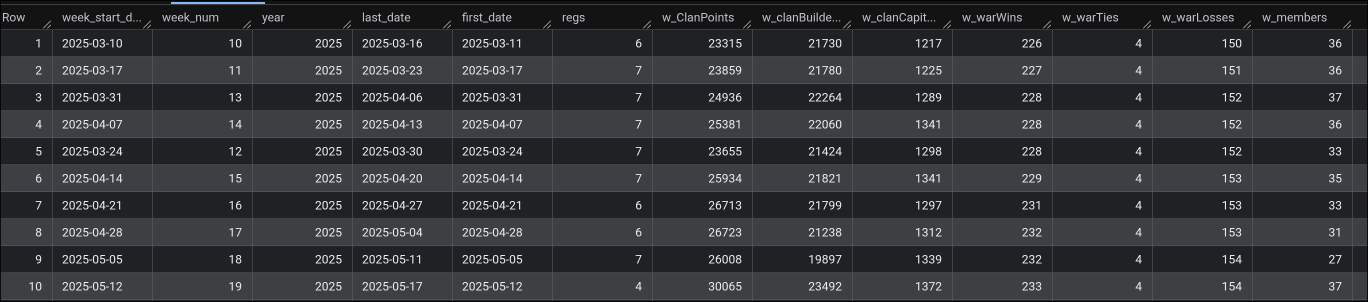
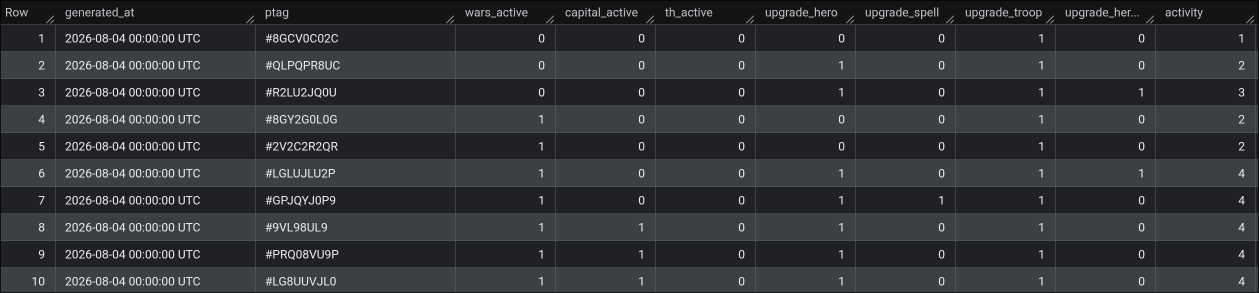
They are ready to be loaded and will serve to build the following dashboard.
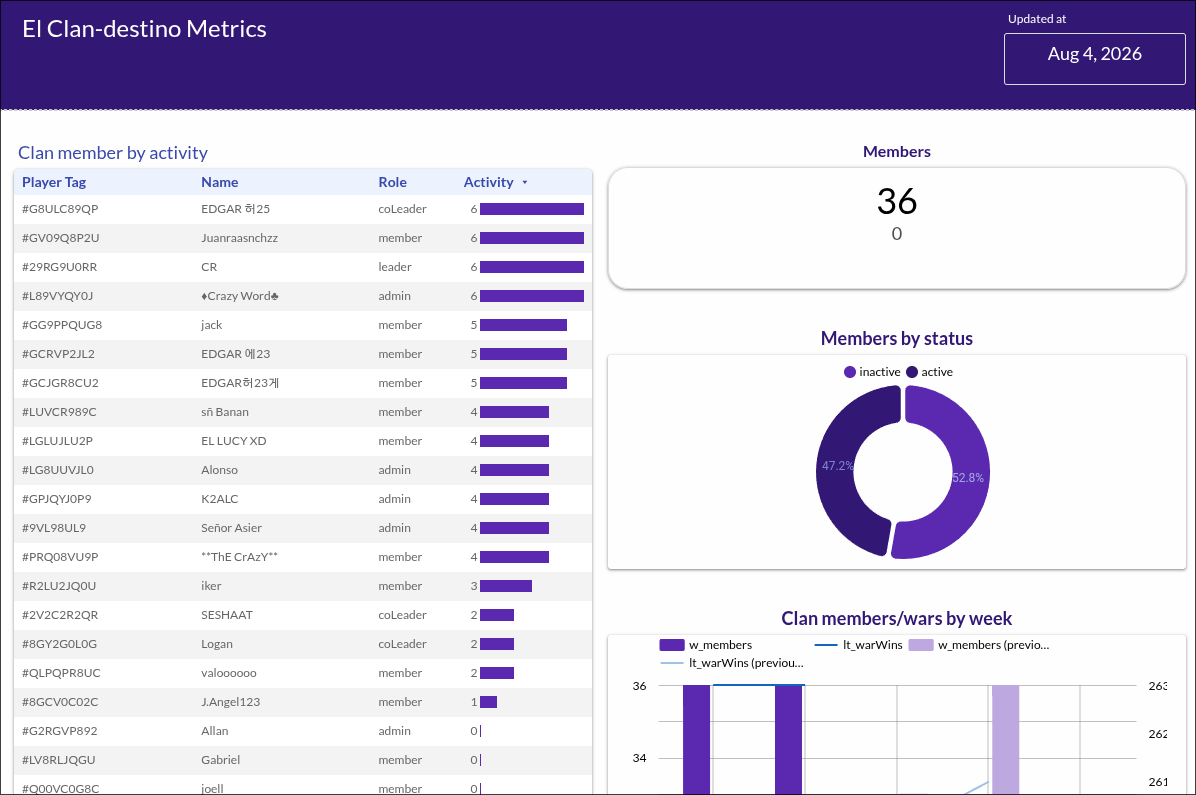
You can see this dashboard updating every day at Looker Studio
Conclusion
This is a summary of the implementation, the complete project can be found at [link_repo]. Now that we have it running in production, I will dedicate future blogs to explaining best practices and architecture decisions, but first it was necessary to give you the big picture.