Data Transformation: Structuring Data with Dataform
Before diving into this post, I should highlight that this is the sequel to How to build a robust ELT pipeline, where I explained the ingestion layer. In this post, we will cover the transformation stage. While these concepts apply across various cloud providers, our implementation details will focus on the Google Cloud ecosystem. Let’s get started.
The Stack
To implement a production-grade data transformation process, we need to rely on the following tools:
- Google Cloud Workflows (mentioned in the first post).
- Google Dataform - Today’s main highlight, enabling us to implement the Data as Code (DaC) paradigm. Specifically, it allows us to: - Version-control queries as they are developed. - Define data quality assertions; if something fails, we know exactly where and why. - Manage metadata and cataloging, which is essential for team collaboration and data governance.
- BigQuery - The serverless data warehouse at the heart of our architecture, natively integrated with Dataform.
The Code
All project queries, the infrastructure as code (using Terraform), and deployed services can be found at github.com/JoseChavezUriarte/coc_elt.
How It Works
Behind the scenes, Dataform orchestrates our SQL queries. Instead of conventional SQL files, we write .sqlx files. These are very similar to standard SQL but only require a SELECT statement; the DDL (Data Definition Language) queries are managed under the hood through configuration metadata. A typical query file contains two main sections:
Configuration
This block defines where, how, and in what format the data is materialized. Let’s look closer:
config {
  type: "incremental",
  schema: "coc_silver",
  uniqueKey: ["extracted_date", "ptag", "troop_name"],
  description: "Denormalized and deduplicated silver table containing player troop statistics.",
  tags: ["silver", "daily"],
  bigquery: {
    partitionBy: "extracted_date",
    clusterBy: ["ptag", "troop_village", "troop_name", "troop_level"],
    updatePartitionFilter: "extracted_date >= DATE_SUB(CURRENT_DATE(), INTERVAL 2 DAY)",
    labels: {
      environment: "production",
      domain: "clash-of-clans",
      layer: "silver"
    }
  },
  assertions: {
    uniqueKey: ["extracted_date", "ptag", "troop_name"],
    nonNull: ["extracted_date", "ptag", "troop_name"]
  },
  columns: {
    extracted_at: "Timestamp when the player profile raw payload was retrieved from Clash of Clans API.",
    extracted_date: "Partitioning date derived from extracted_at.",
    ptag: "Unique identifier tag of the player.",
    troop_name: "Name of the troop (e.g. Barbarian, Archer).",
    troop_level: "Current level of the troop upgraded by the player.",
    troop_max_level: "Maximum possible level for the troop.",
    troop_village: "Village where the troop is active (home or builderBase)."
  }
}
This configuration block specifies:
- The target table is incremental. Instead of running full table scans, the transformation is restricted to new or modified records. In our setup, we use a sliding window via the
updatePartitionFilterparameter. Rather than processing only the last run’s data, it dynamically recalculates the last two days of partitions, which is highly beneficial for handling late-arriving data or triggering backfills. - Table granularity is defined via the
uniqueKeyarray. - Partitioning and clustering configurations are defined within the
bigqueryblock. - Data quality contracts are enforced using
assertionsto validate uniqueness and prevent null values. - The
columnsblock acts as our data dictionary, adding descriptions for each field.
Select Statement
The second part of the file is a standard SQL query, with a key difference in the source reference:
WITH parsed_members AS (
  SELECT
    extracted_at,
    DATE(extracted_at) AS extracted_date,
    JSON_VALUE(payload.tag) AS ptag,
    payload.troops AS troops
  FROM
    ${ref("coc_members")}
  ${when(incremental(), "WHERE extracted_at >= TIMESTAMP(DATE_SUB(CURRENT_DATE(), INTERVAL 2 DAY))")}
),

ranked_members AS (
  SELECT
    *,
    ROW_NUMBER() OVER (PARTITION BY extracted_date, ptag ORDER BY extracted_at DESC) AS row_num
  FROM
    parsed_members
),

deduped_members AS (
  SELECT
    extracted_at,
    extracted_date,
    ptag,
    troops
  FROM
    ranked_members
  WHERE
    row_num = 1
)

SELECT
  extracted_at,
  extracted_date,
  ptag,
  JSON_VALUE(troop.name) AS troop_name,
  SAFE_CAST(JSON_VALUE(troop.level) AS INT64) AS troop_level,
  SAFE_CAST(JSON_VALUE(troop.maxLevel) AS INT64) AS troop_max_level,
  JSON_VALUE(troop.village) AS troop_village
FROM
  deduped_members,
  UNNEST(JSON_QUERY_ARRAY(troops)) AS troop
QUALIFY ROW_NUMBER() OVER (PARTITION BY extracted_date, ptag, troop_name ORDER BY troop_level DESC) = 1
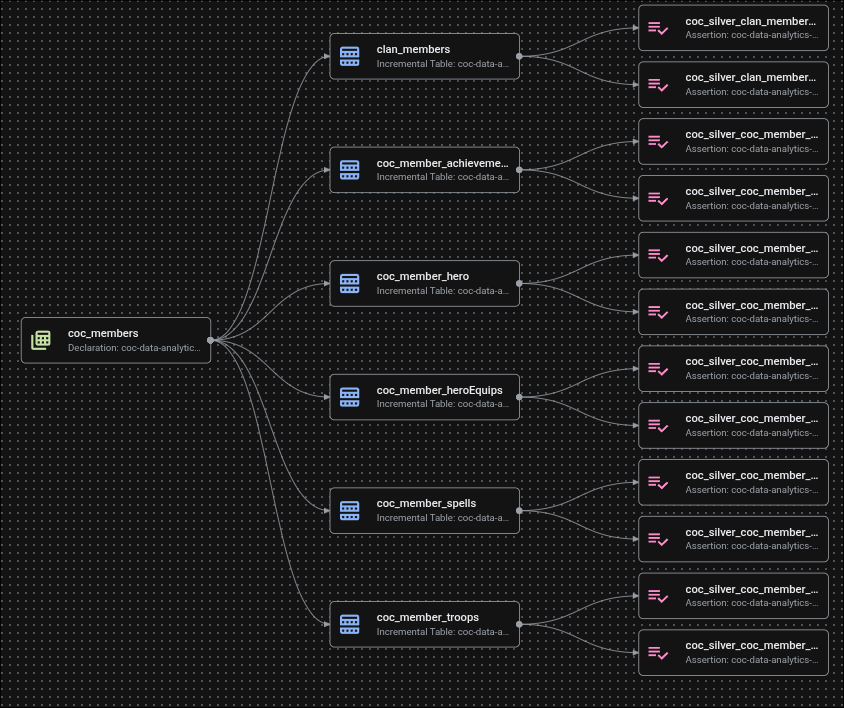
This injection of template syntax ${ref("...")} is fundamental: it allows Dataform to dynamically compile dependencies and build the Directed Acyclic Graph (DAG). The visual graph helps us understand the execution sequence and trace data lineage, which is essential for enterprise data governance. Here is the current Dataform DAG for this project:
Best Practices
When working with Dataform or any other tool that supports the DaC paradigm, keep the following best practices in mind:
- Smart Incremental Architecture: Always filter by partition to optimize both compute resources and query costs.
- Table Partitioning: Partition tables using a chronological attribute (e.g. daily, hourly) to avoid scanning unnecessary data.
- Clustering: Leverage clustering columns (up to four in BigQuery) to act as indexes. Choose these wisely based on the fields most frequently filtered in your
WHEREstatements or used in joins. - Deduplication: Incorporate robust deduplication strategies. In the example above, we use a window function to keep only the freshest record per partition and tag, maintaining consistency from our ingestion layer.
- Data Quality Contracts: Use assertions early and often. It is better to fail loudly and trigger alerts than to silently populate downstream systems with corrupt data.
- Parsing and Safe Casting: Explicitly cast your data. Use
SAFE_CASTwhen working with semi-structured fields to prevent parsing errors and job failures caused by unexpected upstream schema drift. - Data Cataloging: Document every column. Maintaining descriptions in your config blocks keeps your data dictionary automatically updated and accessible to the entire team.
References
- https://www.databricks.com/blog/what-is-medallion-architecture
- https://cloud.google.com/blog/products/data-analytics/transform-sql-into-sqlx-for-dataform/
- https://docs.cloud.google.com/dataform/docs/overview
- https://docs.cloud.google.com/bigquery/docs/partitioned-tables
- https://docs.cloud.google.com/bigquery/docs/clustered-tables