Cloud Process Optimization: From Any Service to BigQuery
When we talk about Google Cloud, or any cloud provider in general, we find countless ways to achieve the exact same result.
In this first post, I want to explore a few ways to do it, taking into account specific use cases, underlying FinOps, and the actual scale of the transformation.
I will simplify these workflows; keep in mind that there are usually intermediate steps and other supporting services that can generate synergy. I will cover those details in future posts. Today, however, we will start with the basics: extracting data from an external service and storing it in your data warehouse-specifically, moving data from any service into BigQuery.
1. First, the Simplest Route: Cloud Run Functions + Cloud Scheduler
Cloud Run Functions are ideal for lightweight processes. If your script runs in under an hour and does not require a static outbound IP address (for example, when the receiving API requires IP whitelisting). While you can technically set up static outbound IPs using VPC Egress, doing so introduces additional architectural complexity and cost, making other alternatives worth considering. This service works well for:
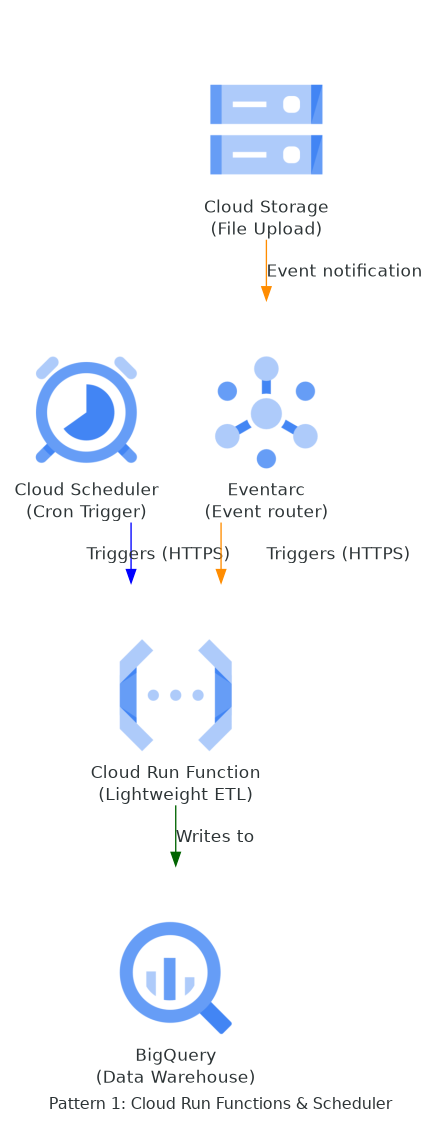
- Running a small crawler or scraper – If you structure the output nicely in JSON, you can save the raw objects directly into a BigQuery table and transform them later.
- Extracting data from an API – Need to query an API programmatically? This is even simpler than scraping. Just make your request and store the payload.
- Updating a table when a file is uploaded to a bucket – Imagine someone uploads an Excel report to a Cloud Storage bucket, and you want to ingest it immediately. You can trigger this automatically using Eventarc, Cloud Run Functions, and BigQuery.
2. A Bit More Complex, But Highly Affordable
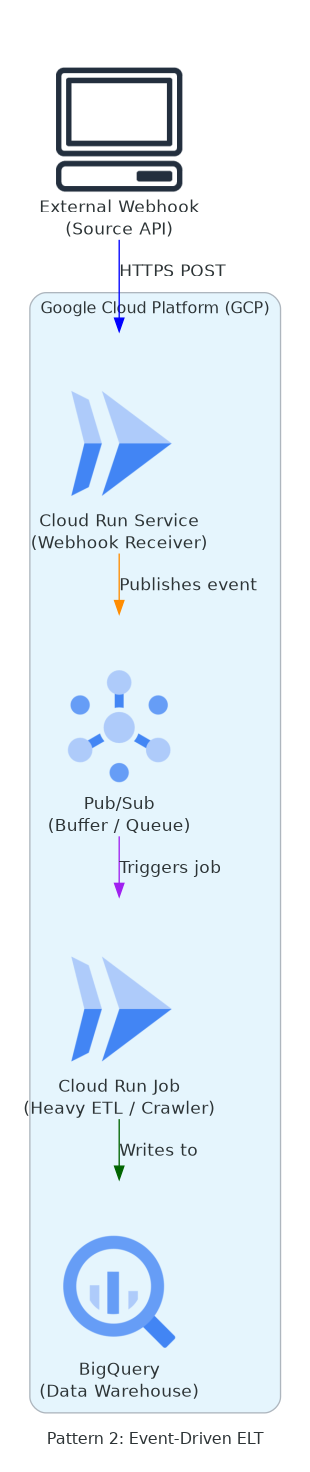
- Complex Crawler – What if your crawler is resource-heavy and takes more than an hour because you are scraping multiple sites and need to avoid rate limits or bans? In this scenario, containerize your script and run it as a Cloud Run Job (which is different from a standard Cloud Run service or function).
- Event-Driven ELT – Imagine an external service sends a webhook signal based on internal conditions you don’t control, essentially just saying “it’s time to sync.” In this case, configure your Cloud Run instance as a service (not a job) to receive the webhook and process it into BigQuery. To make this process more resilient, combine it with Pub/Sub. In this setup, your receiver service on Cloud Run immediately responds with a
200or201status code to the webhook, publishes the payload to Pub/Sub, and then Pub/Sub triggers a secondary processing service (such as the Cloud Run Job mentioned above) to write the data to BigQuery.
Multi-Step Transformations
For data transformations with sequential dependencies (where Step B cannot begin until Step A completes successfully), Cloud Workflows is a perfect fit. It is a fully serverless orchestration service in GCP that is extremely inexpensive when configured properly. Since data pipeline stages are inherently sequential, Workflows coordinates these tasks gracefully based on the execution status of the preceding step.
Summary
In this short post, we explored simple, cost-efficient ways to build data pipelines and the serverless GCP services that make it possible. The goal is to remember that we don’t always need to “use a sledgehammer to crack a nut.” You don’t always need to deploy a full Apache Airflow instance (which incurs a fixed infrastructure cost) or a Cloud Composer cluster (which is even more expensive).
There are, of course, scenarios where investing in heavier orchestrators is necessary, and we’ll cover those in future posts. For now, let’s stick to the basics. In upcoming entries, I’ll walk through code examples for these setups and gradually scale up the complexity and cost. My goal is to build a log of how architectural decisions are made based on complexity and FinOps within the Google Cloud ecosystem.